
Creators
Rojony Khatun Author
Rojony Khatun
CalculatorToolsProjectExpert
Reviewers
Małgorzata Koperska, MD Steven Wooding
Last updated: January 14, 2026

5 Pin Relay Wiring Diagram for Automotive & Electrical

🇺🇸
English
Default
🇪🇸
Español
Spanish
🇫🇷
Français
French
🇩🇪
Deutsch
German
5-pin Relay 9V DC

5-pin Relay 9V DC

Electromechanical relay with 5-pin base, 9V DC coil

SPST Toggle Switch

SPST Toggle Switch

Single Pole Single Throw switch with ON/OFF control

9V Battery

9V Battery

Compact DC power source providing 9 volts

1K Fixed Resistor 1/4W

1K Fixed Resistor 1/4W

A 1,000-ohm resistor rated for 0.25 watts

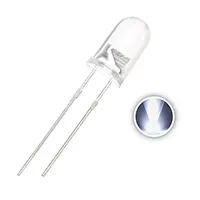
3V LED 5mm

3V LED 5mm

3V, 5mm round light-emitting diode

*Please note: These are affiliate links. I may make a commission if you buy the components through these links. I would appreciate your support in this way!

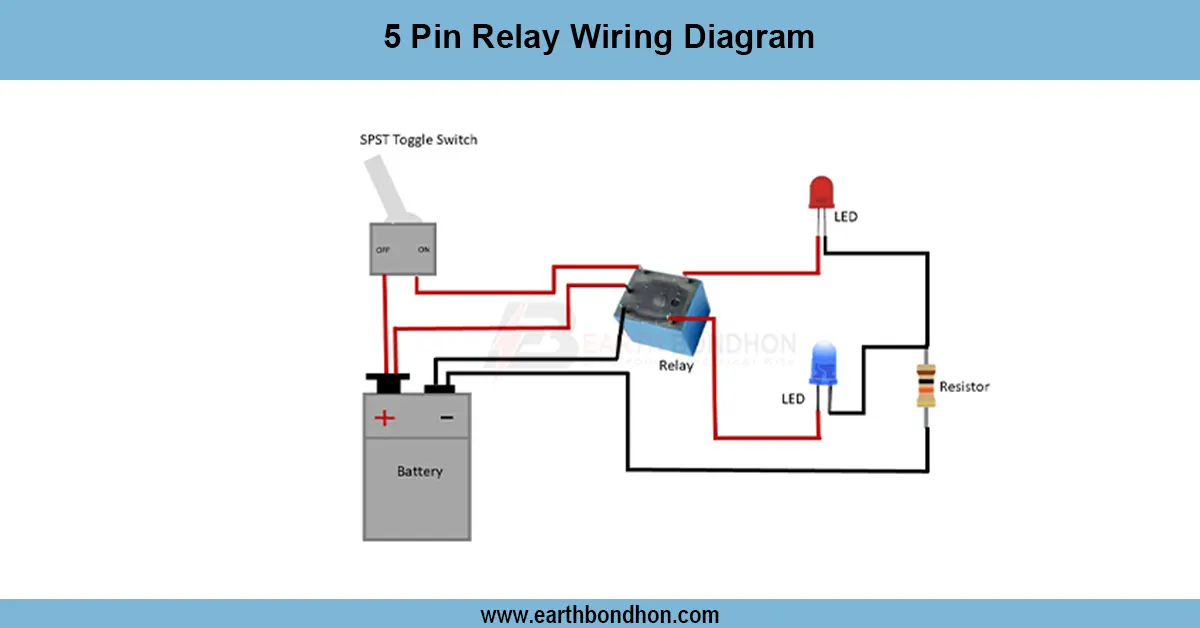
5 pin relay wiring diagram

Learn the 5-pin relay wiring diagram with terminals 85, 86, 30, 87, and 87a. Step-by-step connection guide for automotive, lighting, and motor control systems.
Relay switch wiring diagram

A 5 pin relay has terminals 85 and 86 for coil, 30 as common, 87 as normally open (NO), and 87a as normally closed (NC), allowing dual circuit control.

BC547 LED controller:

It is a very simple and efficient method of controlling the lights on and off of the small light or LEDs with just a fingertip using the BC547 touch sensor light control circuit. It incorporates the BC547 NPN transistor as a switch that reacts to the touch of the sensor pad to enable current to pass through the LED or the connected light. This removes the use of mechanical switches, hence it is perfect for DIY electronics projects, home automation, and educational experiments. One side of the touchpad is connected to the base of the transistor by a current-limiting resistor, and the remaining two connect to the load current. Power to the circuit is supplied by a 312V DC source based on the load and use. The sensitivity is also adjustable by varying the values of resistors, and the resistor is also reliable across various environments. In the case of more powerful lights, a relay or MOSFET may be included. It can be installed on a breadboard or PCB with ease, and safety and durability are guaranteed with proper insulation. It is the small, energy-saving touch sensor that offers a modern, touch-free mechanism of controlling lights.

⚡ Work & Installation (Input → Output):

The circuit operates on the principle of linking a touchpad to the bottom of the transistor BC547 by means of a current-limiting resistor. Upon touching, a small current is caused to pass through the base, and the transistor turns on, and current can pass through the collector to the emitter. This changes the light that is being connected to. By removing the touch, the light is switched off by turning the transistor off, breaking the base current. Installation comes by installing the touchpad, resistors, and the BC547 transistor on a PCB or breadboard. Power is delivered through a 312V DC source as per the load. The touchpad is the input, and the light or LED is the output. In the case of heavier loads, a relay or MOSFET may be included. Proper insulation and wiring are a guarantee of long-term functioning.

Testing & Final Adjustments:

Once the circuit has been assembled, power it and touch the pad. LED is to be activated on a touch and on release (or bistable with a dewith a operate bistably). The non-response of it should be checked in connections, particularly the resistor between the touchpad and the transistor base. Turn the resistor up or down to make it more sensitive or less sensitive. The larger the resistance, the lower the sensitivity and vice versa. Make sure the transistor BC547 is well-powered and it is not overloaded. To power more powerful lamps, include a relay or MOSFET driver. Make sure that the circuit is not overheating and everything is fastened. Secure the parts on a PCB and cover wires where necessary. After testing and tuning, the touch sensor is a reliable way to operate the light with the fingertips, which can be easy, energy-saving, and mechanically free to use in a home lighting system or in a small electronics project. It is a perfect arrangement fit for hobbyists and amateurs who would like to have a simple and responsive touch-type light control circuit.

Frequently Asked Questions - 5 pin relay wiring diagram:

What is a 5 pin relay?

It is an electromechanical switch with 85, 86, 30, 87, and 87a terminals.

What is terminal 85 in relay?

It is one side of the coil, usually connected to ground.

What is terminal 86 in relay?

It is the other side of the coil, connected to positive or switch.

What is terminal 30 in relay?

It is the common input power terminal.

What is terminal 87 in relay?

It is the normally open (NO) output contact.

What is terminal 87a in relay?

It is the normally closed (NC) output contact.

What voltage does a 5 pin relay use?

Commonly 12V or 24V depending on design.

Where is 5 pin relay used?

In cars, lights, motors, and automation systems.

Can I use 5 pin relay as 4 pin?

Yes, just ignore the 87a terminal.

How to test a relay?

Apply voltage to coil (85–86) and check switching between 30, 87, and 87a with a multimeter.

Comments

Please login to comment.

Rojony Khatun

Rojony Khatun

Calculator Tools Project

Rojony Khatun is the creator of a free online tools website designed to simplify everyday and engineering-related calculations for students, professionals, and hobbyists. The platform offers a wide variety of basic and advanced calculators across key categories, including Electrical Calculators, Electronic Calculators, and Time & Date Calculators, helping users solve problems quickly and accurately.