
Creators
Rojony Khatun Author
Rojony Khatun
CalculatorToolsProjectExpert
Reviewers
Małgorzata Koperska, MD Steven Wooding
Last updated: January 14, 2026

AC 220V Fan Speed Controller Circuit Using Triac and Diac

🇺🇸
English
Default
🇪🇸
Español
Spanish
🇫🇷
Français
French
🇩🇪
Deutsch
German
BT150 SCR

BT150 SCR

Medium-power silicon controlled rectifier with voltage rating ~600–800V and current handling around 12A

DB3 DIAC

DB3 DIAC

Bidirectional trigger diode with a breakover voltage of ~30V

0.1µF 400V Capacitor

0.1µF 400V Capacitor

A non-polarized film/ceramic capacitor with 0.1 microfarad capacitance and 400V voltage rating

100K Fixed Resistor

100K Variable Resistor

Adjustable resistor with 100,000 ohm resistance

2.2K Fixed Resistor 1/4W

2.2R Fixed Resistor 1/4W

A 2200-ohm resistor rated for 0.25 watts

*Please note: These are affiliate links. I may make a commission if you buy the components through these links. I would appreciate your support in this way!

AC Motor Speed Controller

Build an AC 220V fan speed controller using a triac and a diac. Easy, efficient, and safe circuit for adjusting ceiling or table fan speed.
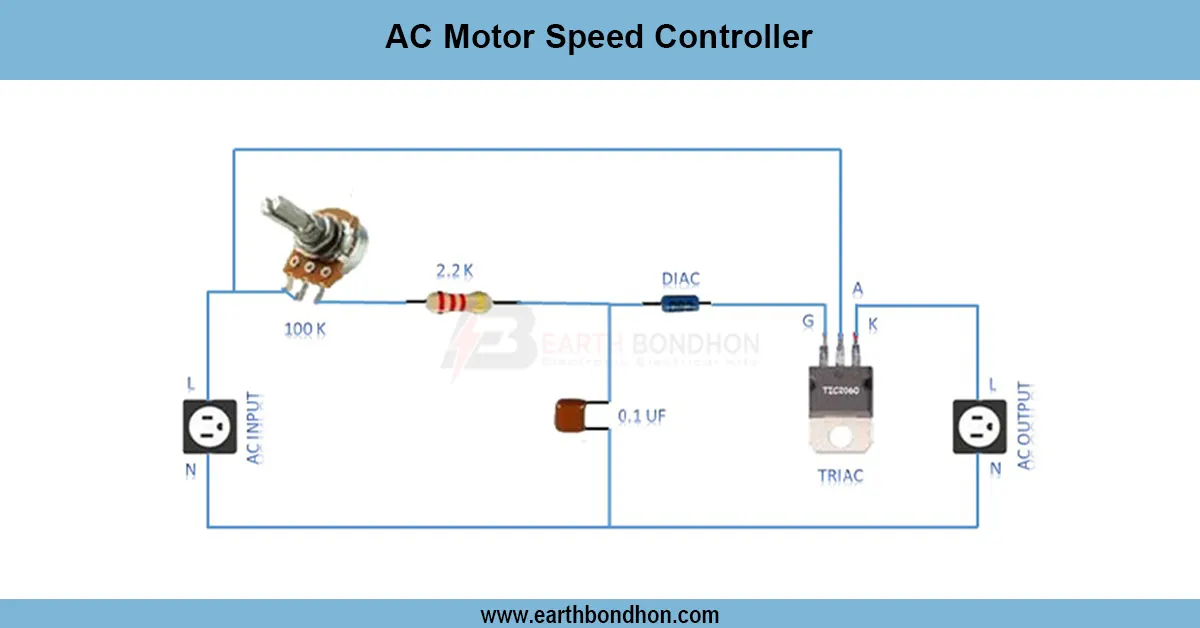
AC fan speed controller circuit

The AC 220 V fan speed controller is designed as a triac–diac phase control device to adjust the voltage to the motor to give an efficient fan adjustment in speed, without any unnecessary heat loss.

making 12V battery from laptop battery

The 12V Battery Using Old Laptop Battery Circuit is an economical and environmentally friendly method of recycling old laptop Lithium-ion cells to form a 12V battery for use in DIY electronic systems. The battery is capable of being safely charged and used to power small DC devices by connecting several laptop cells in series and parallel with a protection and boost circuit.

It is an excellent project that includes hobbyists, makers, and students who wish to recycle old batteries and, at the same time, come up with a dependable 12 V source of power. This tutorial describes the materials needed, the working principle, the circuit diagram, and the step-by-step instructions that one should follow to construct a 12 V battery safely using old laptop batteries.

DIY 12V Battery Pack from Old Laptop Cells (18650)

Guide — components, working principle, construction steps, applications, safety & troubleshooting.

Components Required for the Circuit

  • Old laptop lithium-ion cells (18650 or similar)
  • Battery Management System (BMS) module for protection
  • Boost converter module (3.7V → 12V step-up)
  • Wires and connectors
  • Heat shrink tubing
  • Soldering tools
  • Multimeter for testing
  • Optional: battery holder or enclosure/case

Working Principle of a 12V Battery Using Old Laptop Cells

Lithium-Ion Cell Configuration

Connect 3 or 4 cells in series to reach approximately 11.1–14.8V nominal (3× cells ≈ 11.1V nominal, 4× ≈ 14.8V nominal). Parallel strings can be added to increase capacity (mAh) and current capability.

Boost Converter Stage

A step-up (boost) converter stabilizes output at a regulated 12V, ensuring connected DC devices see consistent voltage even as cell voltage changes during discharge.

Protection Circuit

The BMS provides essential protections: overcharge, overdischarge, short-circuit protection and cell balancing for multiple cells/strings.

Circuit Diagram (Textual Overview)

  1. Identify good cells with a multimeter (voltage & internal health).
  2. Arrange compatible cells in series (3 or 4 cells per string) to reach the desired nominal voltage.
  3. Add parallel strings if you need greater capacity — ensure matched cell voltages and health.
  4. Connect the assembled pack to the BMS module following the BMS pinout for series cell count.
  5. Connect BMS output (pack +/−) to the boost converter input.
  6. Adjust the boost module to output a stable 12V (use a multimeter to confirm) and wire the output terminals for load connection.
  7. Insulate, secure, and enclose the pack (heat shrink, holders, or enclosure).

Note: This is a textual overview. Always follow the BMS manufacturer’s connection diagram and safety guidelines.

Step-by-Step DIY Construction Guide

  1. Test each laptop cell with a multimeter — discard cells with voltage < 2.5V or visibly damaged cells.
  2. Group cells into series strings (3 or 4 cells). Ensure matched voltages and capacities within each string.
  3. Solder or spot-weld reliable connections — soldering directly to cells can heat them; use proper technique and minimize heat exposure.
  4. Connect to the BMS following the BMS pinout carefully (B-, B1, B2, ... P-, P+ etc.).
  5. Attach the boost converter to the BMS pack output, then adjust the converter potentiometer to set 12V output (verify with a multimeter).
  6. Encase the pack with heat shrink tubing, battery holder, or a ventilated enclosure; secure wiring and add insulating tape.
  7. Final test: Measure the final pack voltage and test with a low-power DC device first.

If unsure at any step, seek guidance from experienced technicians — lithium battery assembly carries real hazards.

Applications of a 12V Pack Made from Laptop Cells

  • Power small DC electronics and hobby projects
  • Portable 12V LED strips or lamps
  • Mini UPS for routers, modems or microcontroller projects
  • Rechargeable battery packs for gadgets
  • Recycling old cells into useful energy storage

Safety Precautions — Read Carefully

  • Always check cell voltage & condition before use — damaged, swollen, or low-voltage cells are unsafe.
  • Use a proper BMS (matched to series cell count) to prevent overcharge, overdischarge, and imbalance.
  • Avoid short circuits between cell terminals — they can cause fire or explosion.
  • Do not overheat, puncture, or crush cells. Soldering requires care — minimize heat and use spot-welding when possible for series/parallel connections.
  • Charge only with compatible lithium-ion chargers and follow charging specifications.
  • Work in a safe, ventilated area and keep a suitable fire extinguisher nearby (Class D or lithium-battery rated if available).
  • If uncertain, stop and consult an expert. Improper handling of Li-ion packs is hazardous.

Troubleshooting — Common Issues & Quick Checks

Battery Not Charging

  • Verify BMS connections and correct cell polarity.
  • Check the input to the boost converter and the charger/adapter voltage.

Overheating Issues

  • Ensure cells are balanced and not being overloaded.
  • Verify the boost converter's current rating matches your load; reduce load if necessary.

Boost Converter Not Working

  • Adjust the converter potentiometer and remeasure the output with a multimeter.
  • Confirm proper wiring from the BMS module to the boost converter input.

Frequently Asked Questions - AC Motor Speed Controller:

What is a 220V fan speed controller?

It is a circuit that adjusts fan speed by controlling AC supply voltage.

Which components are used?

A triac, diac, potentiometer, resistor, and capacitor.

Is it energy efficient?

Yes, unlike resistive regulators, it saves power by phase control.

Can I use it for table fans?

Yes, it works for both ceiling and table fans.

Does it reduce fan noise?

Yes, when properly tuned, it reduces humming compared to resistive methods.

Is a heat sink needed?

Yes, for the triac to dissipate heat safely.

What voltage does it handle?

It is designed for 220V AC mains supply.

Can I use it for LED lights?

Yes, but only if the LED supports dimming.

Is it safe to install at home?

Yes, with proper insulation and protection.

What is the working principle?

Phase-angle control of AC waveform using triac and diac.

Comments

Please login to comment.

Rojony Khatun

Rojony Khatun

Calculator Tools Project

Rojony Khatun is the creator of a free online tools website designed to simplify everyday and engineering-related calculations for students, professionals, and hobbyists. The platform offers a wide variety of basic and advanced calculators across key categories, including Electrical Calculators, Electronic Calculators, and Time & Date Calculators, helping users solve problems quickly and accurately.