5V to 1.5V Converter Circuit
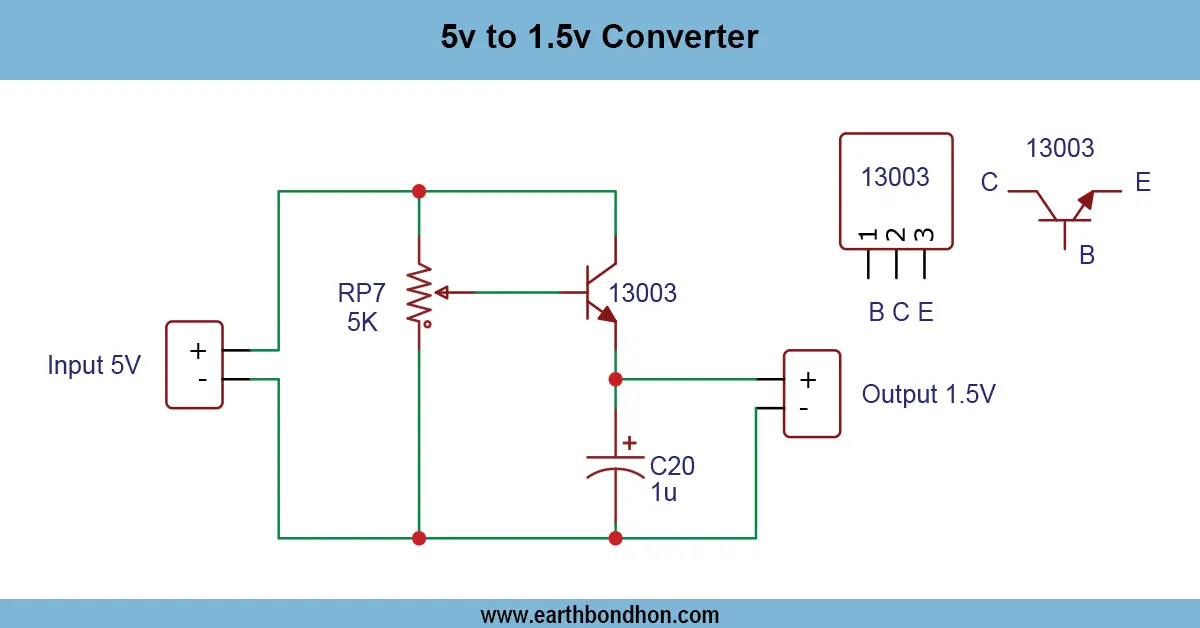
Learn how to convert 5V DC to 1.5V using a simple step-down (buck) converter. Perfect for low-power electronics like sensors, LEDs, and microcontroller peripher...
dc to dc step down 5v to 1.5v
A step-down voltage regulator like LM317 or a buck converter IC can be used to make 5V into 1.5V. They are circuits where the voltage can be reduced, and on the 1.5V devices, which present a stable current source. They also help guard against overvoltage damage of low voltage circuitry and can be observed in battery-powered equipment and embedded systems. Heat management and selection of the components will give good performance.
running led rice light circuit
A Running LED Rice Chain Circuit is an example of a decorative electronic lighting installation that creates a chasing, sequential, or flowing effect of LED. It finds common application in festivals, celebrations, decoration of rooms, lighting on a stage, toys and other DIY electronic projects. The circuit produces the illusion of lights that are being run between lights, as with fairy lights or rice lights. A typical example is the Running LED Rice Chain Circuit, which uses a 555 Timer IC as a pulse generator and a 4017 Decade Counter IC to sequentially turn on LEDs. The LEDs are switched on sequentially by the clock pulses as they pass through the 4017 output, giving a beautiful running effect. This tutorial describes the way the circuit works, includes a list of the necessary parts, includes circuit diagrams and easy-to-follow steps so you can build your own running LED rice chain to either adorn your home or to use as a hobby project.
How the Running LED Effect Works
Sequential Light Movement
Each LED turns on one after another rapidly, creating a “running” or “chasing” light effect.
IC-Based Control (555 + 4017)
- NE555 generates clock pulses based on resistor-capacitor (RC) values.
- CD4017 Decade Counter shifts HIGH output Q0 → Q1 → … → Q9 sequentially.
- Each output powers an LED or LED segment.
Microcontroller-Based Version
- Use Arduino, ATmega328P, or PIC microcontrollers.
- Advantages: Multiple patterns, adjustable speed, fade effects, smooth animation.
Components Required
Basic Circuit Components
- 1 × NE555 Timer IC
- 1 × CD4017 Decade Counter IC
- 10 × LEDs (any color)
- 1 × 10kΩ resistor
- 1 × 100kΩ resistor
- 1 × 1kΩ resistor (for LEDs)
- 1 × 10µF capacitor
- 1 × 0.1µF capacitor
- 5V–12V power supply
- Breadboard/PCB & connecting wires
Optional Upgrades
- Transistor drivers for high-power LEDs
- PWM dimming circuit
- Arduino programmed patterns
- RGB LEDs for colorful effects
Circuit Diagram & Working Principle
Timer Section (555 IC)
Pin 3 outputs clock pulses. Frequency is determined by 1 / (0.693 × (R1 + 2R2) × C). Adjust R2
or C1 to change the LED running speed.
Counter Section (4017 IC)
- Pin 14 = Clock input
- Pin 3–11 = Outputs Q0–Q9
- Only one output goes HIGH at a time, lighting the corresponding LED.
Output Section
LEDs are connected to each Q output with resistors. Use transistors for high-brightness LEDs.
DIY Step-by-Step Making Guide
- Gather all parts and verify polarity for capacitors and LEDs.
- Connect 555 in astable mode and set timing for 3–10 pulses per second.
- Connect 555 output to 4017 Pin 14 and LEDs with resistors to Q0–Q9.
- Apply 5–12V DC power and test LED sequence.
- Create a rice LED chain using small 3mm LEDs on decorative wire with heat-shrink tubes.
Applications
- Home decoration
- Festival lights
- Christmas decoration
- Puja lighting
- Bedroom ambience lights
- Electronics projects & IC tutorials
- Arduino training
- Garlands, wedding stage lights, shop display borders
Troubleshooting & Solutions
- LEDs Not Running: Check R1, R2, C1 polarity.
- Some LEDs Not Lighting: Inspect wiring and LED polarity.
- Running Too Fast/Slow: Adjust capacitor (1µF–47µF).
- Circuit Gets Hot: Ensure resistors are used (330Ω–1kΩ per LED).
Safety Tips
- Always check the polarity of components.
- Never connect LEDs directly to 12V.
- Do not short 4017 or 555 pins.
- Handle power supply with care.
Frequently Asked Questions - 5V to 1.5V Converter Circuit:
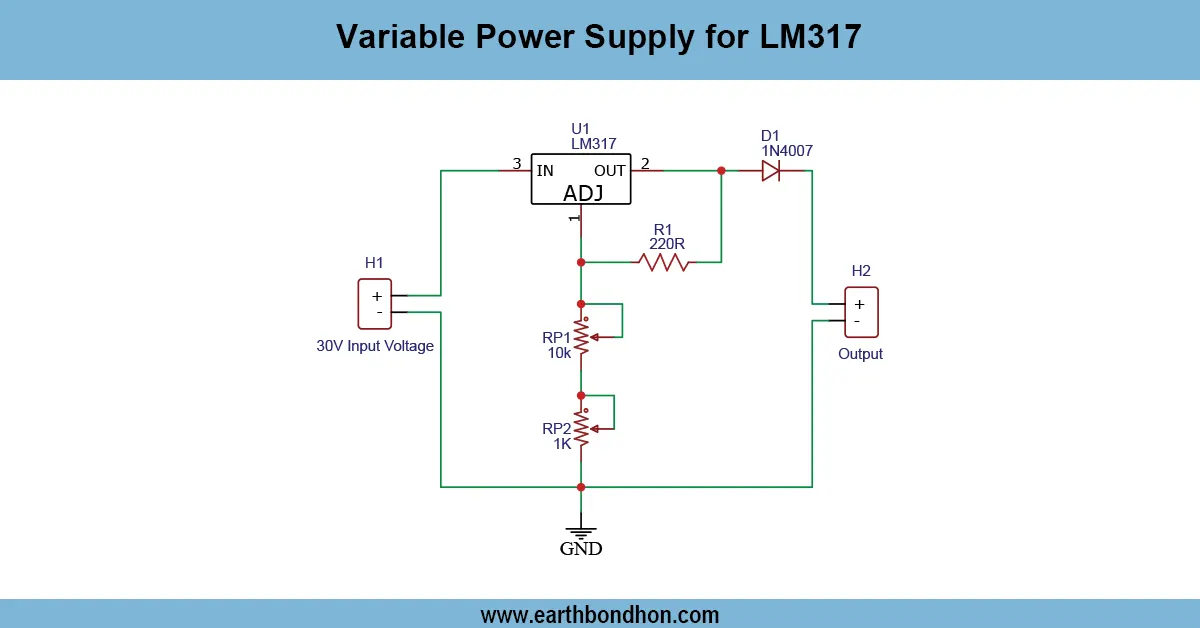
Can I use an LM317 to convert 5V to 1.5V?
Yes, with proper resistor values, LM317 can output 1.5V from 5V.
What is the efficiency of a 5V to 1.5V buck converter?
Typically around 80–95%, depending on the load and design.
Is 1.5V safe for LEDs?
Only if the LED forward voltage is ≤1.5V; otherwise use a resistor or boost.
Can I use this to power a watch?
Yes, many watches run on 1.5V and need low current, which this converter can handle.
What type of regulator is best?
Switching regulators are more efficient than linear for larger current loads.
How do I test the output voltage?
Use a multimeter set to DC voltage across the output terminals.
Do I need a heatsink for 5V to 1.5V?
For linear regulators under heavy load, yes. For switch-mode, usually not.
Can I step down USB 5V to 1.5V?
Yes, with a buck converter or LDO regulator like AMS1117-1.5.
What components are needed?
Typically a regulator IC, input/output capacitors, and sometimes resistors.
Is 1.5V enough to run a microcontroller?
Some ultra-low-power MCUs can operate at 1.5V, but most need ≥1.8V.