

photocell sensor wiring
Learn photocell sensor bypass circuit wiring with a manual switch to keep light ON anytime or auto mode for day-night control.
photocell sensor bypass circuit wiring diagram
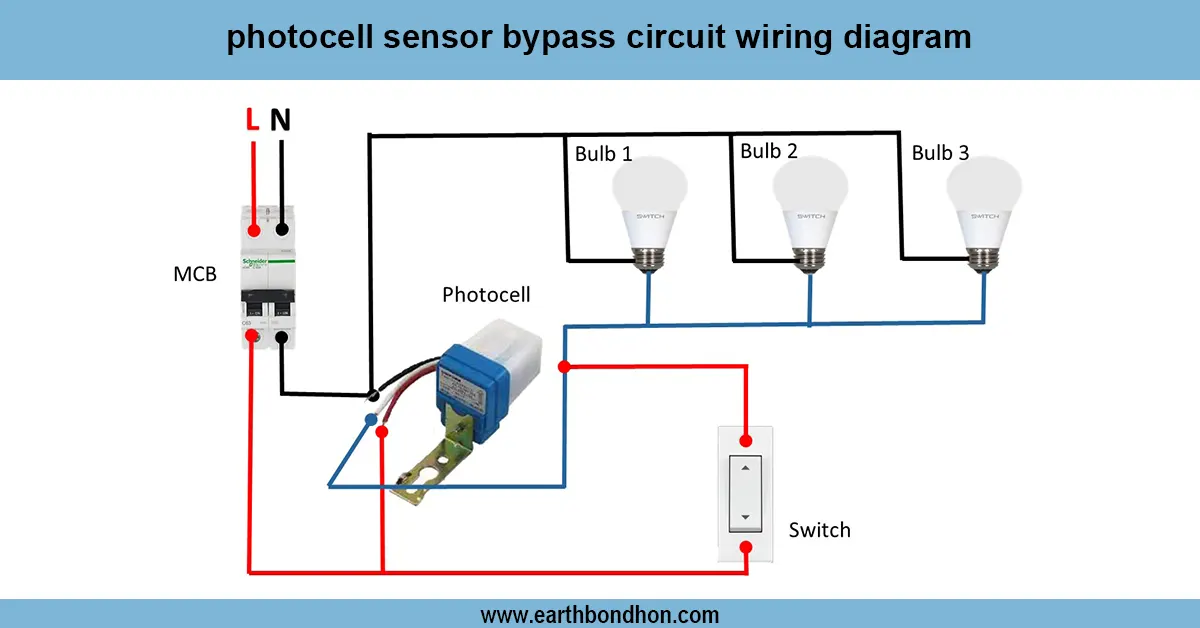
To operate lights inside Auto mode (sensor) or Manual ON mode (switch) at any time, a photocell bypass circuit also uses a manual switch next to the sensor.
day night sensor bypass circuit diagram
The photocell sensor bypass circuit wiring diagram illustrates the method of adding a manual switch along with the sensor. A photocell sensor usually works to turn lights ON when it is dark and turn them off when it is bright. However, at times you might wish to override the sensor and switch the light on by yourself during the day or in an emergency. The bypass line is realized as a parallel switch between the photocell sensor output and a parallel switch. In the off state, the sensor regulates the light. When the switch is ON, the sensor is bypassed, direct power is sent to the light, making it remain ON no matter what time of the day. Such an approach is typical in street lights, garden lights and security lighting, that provide flexibility between Auto and Manual.
Work / Installation (Inputs → Outputs)
- Turn OFF the power supply.
- Connect Phase (Live) from the main supply to the photocell sensor input (L).
- Connect Neutral from supply directly to the light’s neutral.
- Add a bypass switch in parallel with the photocell sensor output and input. 1. One side of the switch connects to the Phase (before sensor input). 2.Other side of the switch connects to the Light (after sensor output).
- Earthing connections should be done if available.
👉 In Auto mode, the switch is OFF and the photocell works normally.
👉 In Bypass mode, turning ON the switch powers the light directly.
Testing & Final Adjustments
Once installed, restore the supply. The first step is to have the bypass switch off and test the operation of the photocell: cover sensor and light goes ON, uncover sensor and light goes OFF. Then, bypass mode: flipping the switch ON this time the light should turn on immediately, no matter what time of day it is. Unless the light is functioning in bypass mode, recheck switch wiring (phase-in and phase-out). Outdoor installations need to be insulated and waterproof. Install the sensor where there is daylight and with no artificial light reflections. Clean the sensor cover periodically. This will allow the use of Auto mode as an energy-saving mode and Manual mode in case of emergencies.