
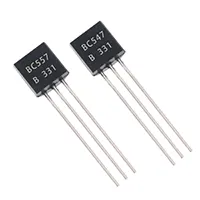

BC547 Touch Switch Circuit
Build a simple BC547 touch switch circuit. Turn on/off lamps or small devices by touch with a low-cost transistor-based electronic switch.
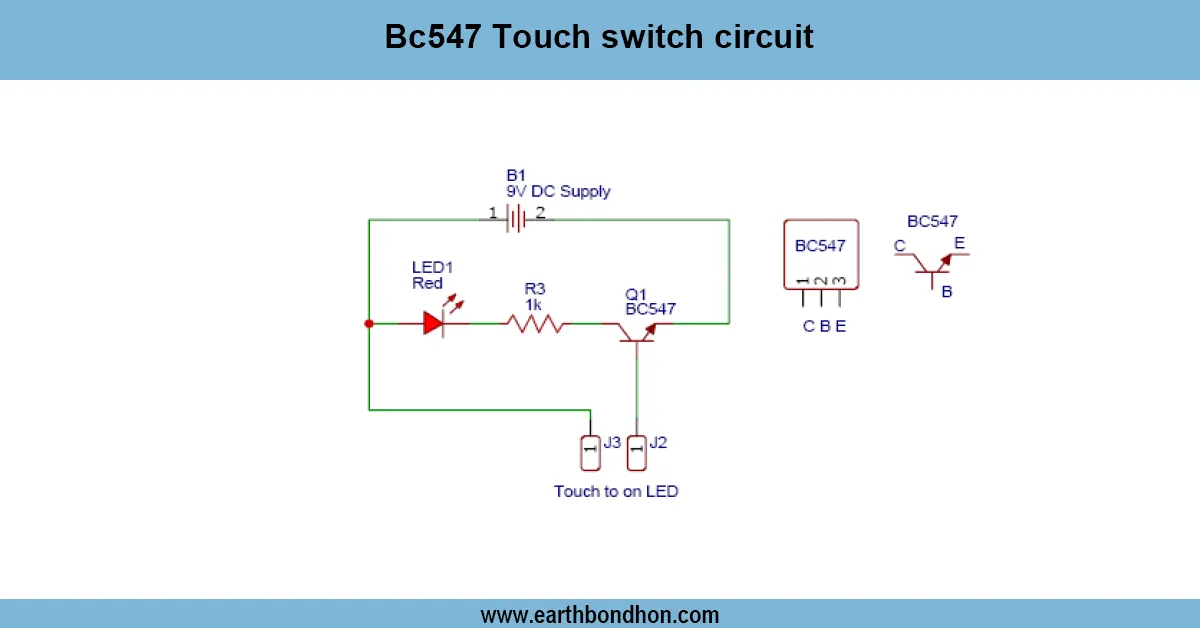
touch sensor switch using transistor
A light-touch switch circuit allows you to work with devices by touching it with your fingers. The BC547 transistor is used to amplify the touch current to turn on/off lights, relays or lamps automatically.
transistor touch control circuit
BC547 Touch Switch Circuit - It is a small electronic monitor that enables devices to be turned on or off by simply tapping a metal plate. It makes use of a BC547 NPN transistor to multiply the little current produced by a human touch, which then opens a relay or an LED to switch the load. The circuit can be used in DIY electronic engineering, a bedside lamp, or miniature home appliances. This is a very simple design, has a small number of components (BC547, resistors, capacitors and a relay or LED), and works at low voltage. A resistor can be used to connect the touch plate to the bottom of the transistor. By touching the plate, the state of the transistor is altered and the current is able to reach the load.
It is simple, inexpensive, and simple to put together, which is why it is an ideal project to start out in the electronics field, as well as offers a useful, practical hands-on experience in the field of touch-based switching technology.
Work / Installation (Inputs → Outputs)
- Power Input → 5V or 12V DC supply.
- Touch Plate → Connected to transistor base via a resistor.
- BC547 Transistor → Acts as an electronic switch.
- Load Output → Relay, LED, or small lamp turns on/off on touch.
- Installation → Mount the touch plate in a convenient location, ensure proper insulation.
Testing & Final Adjustments
Having constructed the circuit, connect the load and the power supply. Touch the plate and LED or the relay will be switched on and the load will be turned on. On releasing the touch, the load must go off. Change the base resistor value in case the circuit is not touch responsive. In case of greater loading, a relay of suitable current rating should be used. Make sure that all the connections are fastened and covered to avoid short circuity. Repeat tests to determine the sensitivity and stability. To achieve better results, a metal touch plate with a smooth surface should be used and located not in contact with moisture or conductive substances. The calibration is good to make sure that the circuit is sensitive enough to human touch, and it is interactive through hands-on experience.