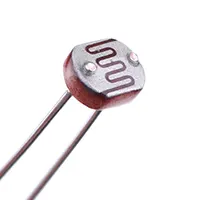
Day Night Sensor Wiring
Automatically turn lights on/off using a BC547 transistor-based day-night sensor. Ideal for LED lamps or night lights without complex ICs.
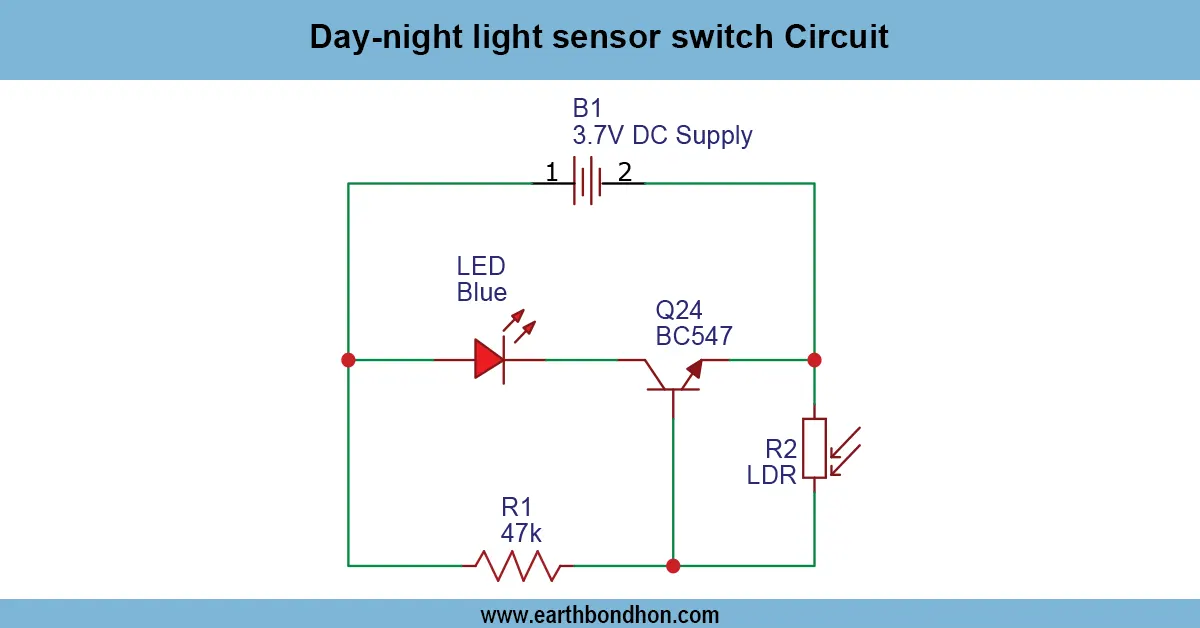
BC547 day-night sensor circuit
An easy and efficient lighting solution is a day-night light sensor switch based on the BC547 sensor, which can be easily used to detect the level of ambient light and automatically turn on the lights used at night and off during the day.
build your own dj bluetooth speaker india
A DIY DJ Bluetooth Speaker Circuit is a project that enables music lovers and electronics enthusiasts to assemble a high-quality and portable Bluetooth audio system in the comfort of their homes. In contrast to the regular Bluetooth speakers, this home-made DJ system offers larger bass, more output and customisation possibilities, including EQ controls, LED indicators and more than one choice of inputs.
This tutorial will demonstrate how to build and construct a DIY DJ Bluetooth Speaker Circuit using easy-to-find components such as a Bluetooth audio receiver module, TDA7492/TDA7498 amplifier IC, speakers, power supply, and control buttons. The instructions are step-by-step and include the design of the circuit, integration of the amplifier, connection of the speakers and pairing via Bluetooth. Through this tutorial, you will be able to construct a powerful and customizable Bluetooth speaker that you can use in practice as a DJ, at a party, or for personal purposes, as well as learn about amplification of sound, the routing of signals, and do-it-yourself electronics.
Advantages of Building Your Own Bluetooth Speaker
- Custom Sound: Adjust amplifier gain, speaker type, and EQ.
- Portable Design: Create compact or large speaker setups.
- Cost-Effective: Cheaper than commercial high-power DJ speakers.
- Learning Experience: Understand audio amplification, Bluetooth technology, and DIY electronics.
- Expandable: Add extra features like LED lights or battery operation.
Components Required for DIY DJ Bluetooth Speaker Circuit
| Component | Quantity | Purpose |
|---|---|---|
| Bluetooth Audio Receiver Module | 1 | Wireless audio input |
| TDA7492/TDA7498 Amplifier IC | 1 | Stereo audio amplification |
| Speakers (woofer + tweeter) | 2–4 | Output sound |
| Power Supply (12V–24V DC) | 1 | Power for amplifier and module |
| Capacitors (100µF, 470µF, 0.1µF) | Various | Filtering and stability |
| Resistors (10Ω–100kΩ) | Various | Biasing, gain, and volume control |
| Rotary or Slide Volume Potentiometer | 1 | Volume control |
| LED Indicators | 1–2 | Power/connection status |
| Switches / Buttons | 1–2 | Power on/off, pairing |
| Heat sink | 1 | Cooling amplifier IC |
| PCB or Perfboard | 1 | Circuit assembly |
| Wires & Connectors | As needed | Connections |
Working Principle of the Circuit
- Power Supply Stage: Provides regulated DC voltage to Bluetooth module and amplifier IC with filtering capacitors to prevent noise.
- Bluetooth Audio Input Stage: Bluetooth module receives audio wirelessly and outputs analog signals to amplifier input.
- Amplifier Stage: Amplifier IC (TDA7492/TDA7498) boosts audio signals. Gain is controlled by external resistors/potentiometers.
- Speaker Output Stage: Amplified audio delivered to woofer and tweeter. An optional passive crossover separates frequencies.
- LED Indicators & Controls: LED shows power/Bluetooth pairing. The volume potentiometer adjusts the output sound.
Circuit Diagram Explanation
- Bluetooth Module Output → Connects to amplifier input (R/L channels).
- Amplifier IC → Receives input, amplifies, drives speaker outputs.
- Power Supply → Provides regulated voltage; includes fuse for safety.
- Speakers → Woofer handles lows; tweeter handles highs.
- Controls → Volume potentiometer adjusts amplitude; switches for power and pairing.
Step-by-Step Construction Guide
- Prepare PCB or Perfboard: Mount amplifier IC and Bluetooth module. Solder power/ground connections.
- Connect Bluetooth Audio Input: Connect the module's analog output to the amplifier input.
- Connect Speakers: Wire speaker outputs, ensuring correct stereo polarity.
- Power Supply Integration: Connect the DC supply to the amplifier and module. Include a fuse.
- Add Controls and LEDs: Wire volume potentiometer and LED indicator.
- Testing and Adjustment: Pair Bluetooth device, adjust volume, and test sound clarity and bass.
Amplifier and Bluetooth Module Integration
- Ensure audio signals are clean and free from noise.
- Use decoupling capacitors near ICs to reduce hum/distortion.
- Use heat sinks to prevent amplifier IC overheating.
Applications of DIY Bluetooth Speaker
- DJ practice and small parties
- Portable wireless music playback
- Home audio system
- Educational electronics project
- Customized party speaker setup
Troubleshooting Tips
- No sound → Check Bluetooth pairing and amplifier connections.
- Distorted sound → Verify power supply voltage and amplifier gain.
- Overheating IC → Add larger heat sink or improve ventilation.
- LED not lighting → Check LED orientation and power connection.
- Bluetooth module not connecting → Reset module and re-pair device.
Frequently Asked Questions - Day Night Sensor Wiring:
Can this work without ICs?
Yes, it uses only BC547 and a light sensor like a photodiode.
What voltage is required?
Typically 5–12V DC depending on the load.
Can it drive LEDs?
Yes, ideal for LED lamps and small night lights.
Is it beginner-friendly?
Yes, easy to assemble and understand.
Can it handle high power lamps?
For higher loads, use a relay controlled by BC547.
Do I need calibration?
Yes, adjust resistor values to set light sensitivity.
Is polarity important?
Yes, BC547 and sensors must be connected correctly.
Can it be used outdoors?
Yes, with proper weatherproofing.
Does it work in total darkness?
Yes, it activates the load when light is insufficient.
Is it low-cost?
Yes, uses basic components like BC547, resistors, and LEDs.