
DC Motor Speed Controller Circuit
Control DC motor rotation direction with BC139 transistors. Build a simple bi-directional motor driver circuit for DIY robotics and electronics projects.
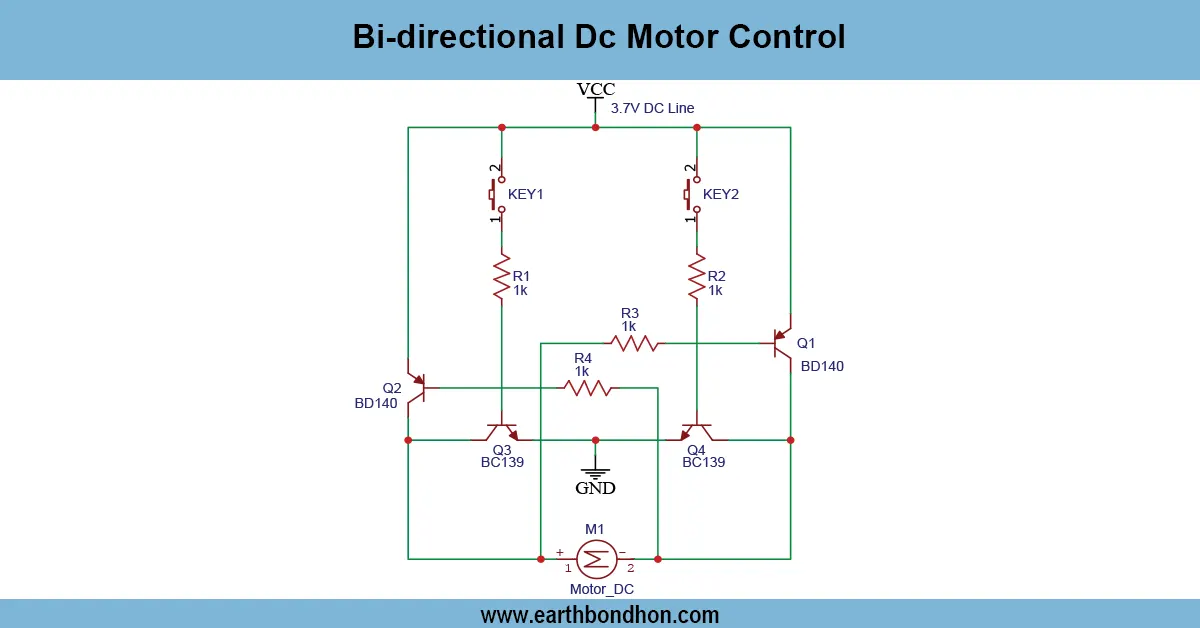
BC139 DC motor control circuit
A DC motor drive circuit can be controlled with two-way movement of the motor with the help of a bi-directional circuit with BC139. BC139 transistors are used to safely switch the Motor current of both directions using an H-bridge configuration.
DC motor forward reverse circuit
This bi-directional dc motor control circuit which uses bi-directional DC motor control circuit with BC139 permits you to move a DC motor forward and reverse. BC139 is an NPN transistor capable of operating moderate-current and, thus, can be used in low-power DC motors in small robotics or automation applications.
The circuit incorporates usually two BC139 transistors in an H-bridge setup alongside diodes to avoid the destruction of transistors by the back EMF. The transistors are regulated by input signals, so that the motor is able to move clockwise or counterclockwise, depending on the pair of transistors which is turned off or on. Further resistors and switches are employed to safely cause current between the transistor bases and regulate flow.
The project offers a practical introduction to transistor switching, H-bridge setup, and motor control and is an ideal choice when a beginner in robotics and electronics wants effective experience in the field. It is cheap, straightforward and very educative.
Work / Installation (Inputs → Outputs)
- Power Supply Input → Typically 6V–12V DC for the motor.
- Control Input → Switches or logic signals to transistor bases.
- BC139 Transistors → H-bridge configuration switches motor current direction.
- Motor Output → Rotates clockwise or counterclockwise depending on active transistors.
- Installation → Connect motor terminals, provide proper heat sinking for transistors if necessary.
Testing & Final Adjustments
Connect the power supply and the motor after connecting the H-bridge with BC139 transistors. Test the various control inputs to confirm the direction of rotation of the motor. Check polarity, transistors are protected against the back EMF by having the diodes installed. Regulate the base resistors so that the transistor does not overheat. Test on load conditions with direction switching to ensure there is reliability. When using larger currents, it is better to look at heat sinks or transistors in parallel. Make sure that all connections are firm to avoid short circuiting. When the connection is verified, fit the circuit on a PCB or breadboard. Frequenty testing and close calibration are considered to make the bi-directional motor operation uneventful and safe and efficient in the case of robotics.