


Single-phase Switchboard with IPS wiring
Learn single-phase switchboard wiring with IPS, including battery, inverter, DP switch/MCB, and load connections for an uninterrupted home power supply.
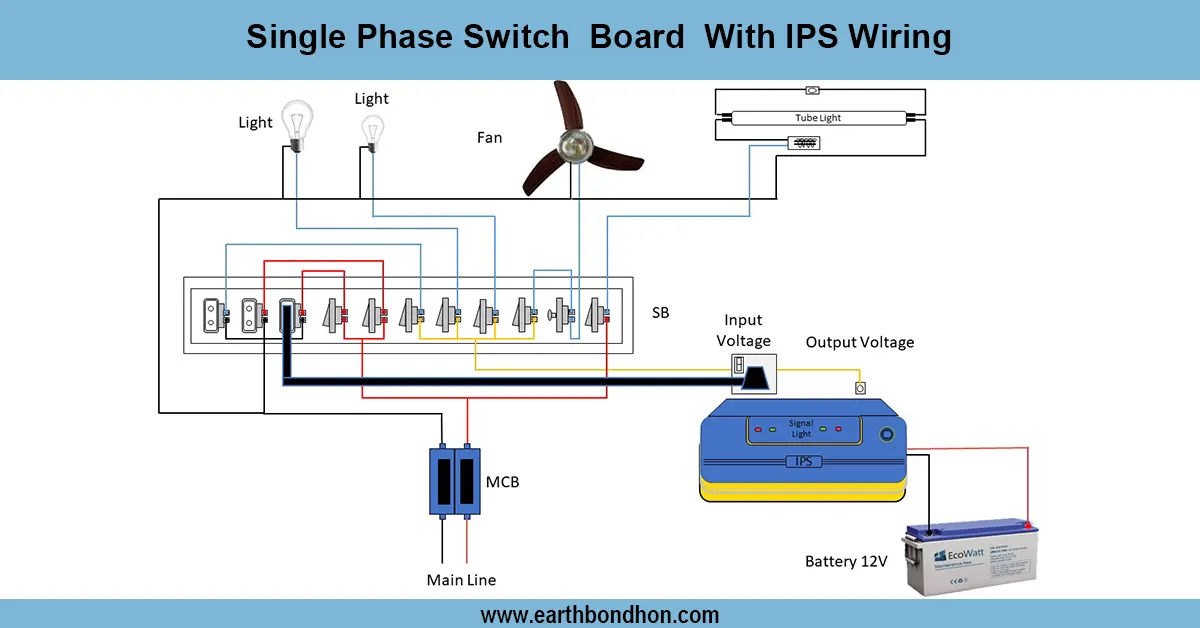
single phase switch board wiring diagram
The following single-phase switch board with IPS wiring diagram depicts a connection between the mains supply, DP switch/MCB, inverter/IPS, batteries, and load terminals on continuity of power supply.
single phase power supply wiring diagram:
One phase switchboard fitted with IPS (Inverter Power Supply) enables homes to have lights, fans, and appliances powered continuously in case of power cuts. The principal supply phase and neutral are connected to the DP switch or MCB to provide protection. The output of the IPS/inverter goes to the switchboard load terminals through a changeover mechanism, so that in case of failure of the mains, the changeover is smooth. The IPS is supported with batteries that provide backup power. Safety requirement is good earthing. The wiring diagram is used to indicate clearly all the connections between the mains supply, the DP switch/MCB, the IPS input/output, the battery, and the load. The adherence to the diagram makes the work safe, eliminates the possibility of overload, and secures the safety of equipment against short circuits or voltage variations. It is a commonly applied setup in residential use to ensure continuous power flow, protection, as well as a backup,h i ch is also economical in the use of energy.
Work & Installation (Input → Output,)
- Mains Input: Phase and neutral from electricity supply connected via DP switch/MCB.
- IPS/Inverter Input: Connected to mains to charge batteries and supply load during outage.
- Batteries: Connected to IPS to provide backup power.
- Switch Board Output: Receives power from mains or IPS through a changeover mechanism.
- Earthing: Proper grounding of IPS, batteries, and switchboard for safety.
- Output: Appliances connected to the switch board operate normally during mains or outage, powered by mains. IPS
This guarantees safe and secure reserve power to homes.
Testing & Final Adjustments
Connect the wiring, and turn on the DP Switch/MCB and ensure that the mains supply is connected to the switchboard. Check inverter /IPS charging and battery connections. Test automatic switching by simulating ma main failure, which appliances should receive power on the IPS without any problem. Check voltage at switchboard load terminals to verify that there is 220 -240 V single-phase output. Check all the connections to make sure they are tight, insulated, and that earthing is correct. Label mains, IPS input/output, and batteries, and easy to identify load terminals. Make sure that the appliances do not flicker or break. The test also ensures that the switch board with IPS offers a constant power supply, overloading, and that the electrical equipment is not subjected to short circuits or fluctuation of voltages. Effective home backup power is available during the outage when there is proper installation.